
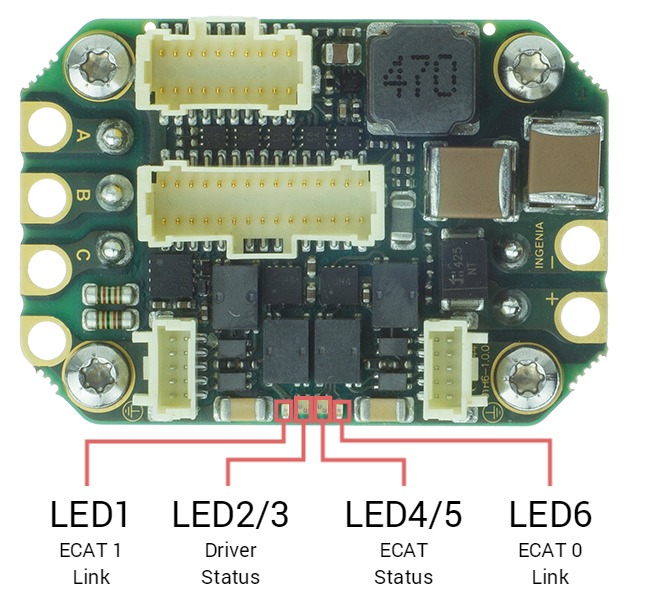
The drive provides information through 6 signalling LEDs:
|
LED |
Type |
Color |
Description |
|---|---|---|---|
|
LED6 |
Single |
Green |
EtherCAT / Ethernet 0 link (ECAT 0 Link or LINK0) |
|
LED1 |
Single |
Green |
EtherCAT / Ethernet 1 link (ECAT 1 Link or LINK1) |
|
LED2/3 |
Bi-color |
Green / Red |
Driver Status. Two LEDs indicate the driver status.
|
|
LED4/5 |
Bi-color |
Green / Red |
EtherCAT / CANopen Status (ECAT Status). Two LEDs indicate the EtherCAT or CANopen status.
|
The meaning of the signaling depends on the product variant, see LED signals reference for details.
LEDs at start-up & Troubleshooting
After powering on, some of the LED signals can help troubleshoot.
EtherCAT
Typical behaviour
If EtherCAT cables are connected on Port 0/1, Link LEDs will light according to the definition.
EtherCAT firmware will start with no other LED because the slave will stay in INIT State after power-up until an EtherCAT master forces it to transition to another state.
|
LED signal |
Start-up behaviour |
|---|---|
|
RUN LED (Green) |
|
|
ERROR LED (Red) |
|
|
RUN & ERROR LED |
|
|
FAULT LED (Red) |
|
The rest of the LED signals follow the standard behavior.
CANopen
|
LED signal |
Start-up behavior |
|---|---|
|
RUN LED (Green) |
|
|
ERROR LED (Red) |
|
|
RUN & ERROR LED |
|
|
FAULT LED (Red) |
|
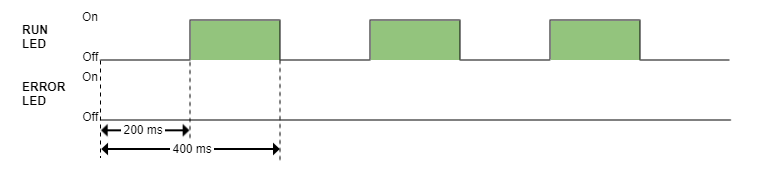
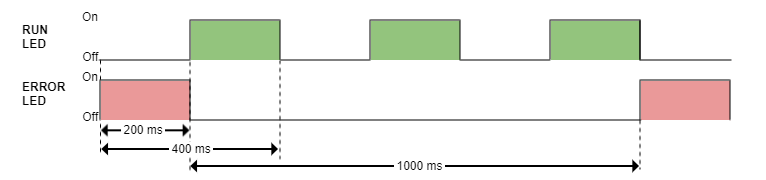
The rest of the LED signals follow the standard behaviour