
Uploading a Register Configuration file using FoE
This feature was implemented in Summit and Summit Safe firmware 2.10.0
This guide explains how to use the accepted CSV format for configuring registers via the File over EtherCAT (FoE) protocol. It covers the file structure, key requirements (CRC, HEX representation), and practical steps for generating and uploading the file.
CSV File Structure
A valid configuration file consists of:
v1
0xFFFFFFFF
0x2000,0x00,0x04D2
0x2000,0x01,0x162E
0x2001,0x00,0x10E1
Field Explanations
-
Line 1: File format version (e.g.,
v1). -
Line 2: CRC (Cyclic Redundancy Check) of the register lines (see below).
-
Line 3+: Register configuration lines, each with three comma-separated fields:
-
INDEX: EtherCAT register index (HEX, uint16_t, little-endian).
-
SUBINDEX: EtherCAT register subindex (HEX, uint8_t, little-endian).
-
VALUE: Value to write (HEX, up to 32 bits, little-endian).
-
Note: All hexadecimal values must use little-endian format.
Key Points
-
CRC: The CRC is calculated over the register lines only (not the version or CRC lines). The XMODEM CRC algorithm is used. If the CRC is incorrect, the device will notify you; registers will be written but not stored until you click
Store All. -
HEX Representation: All values must be in hexadecimal to avoid parsing issues.
-
File Content: Only R/W registers are included. Network settings (MAC, IP, Gateway, etc.) are excluded.
-
Missing Registers: Registers not listed in the file remain unchanged.
How to Generate and Upload the File
-
Generate the File:
-
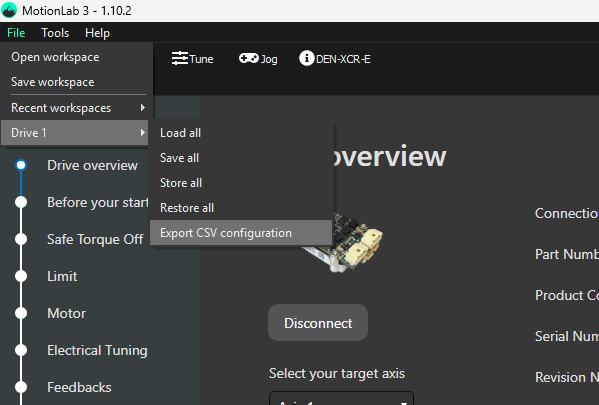
Use the
“Export CSV Configurationbutton in ML3 to export the current configuration as a.csvfile. -
For best results please ensure that the configuration file is saved from a drive with the same firmware as the drive it will be loaded on to.
-
-
Upload the File:
-
-
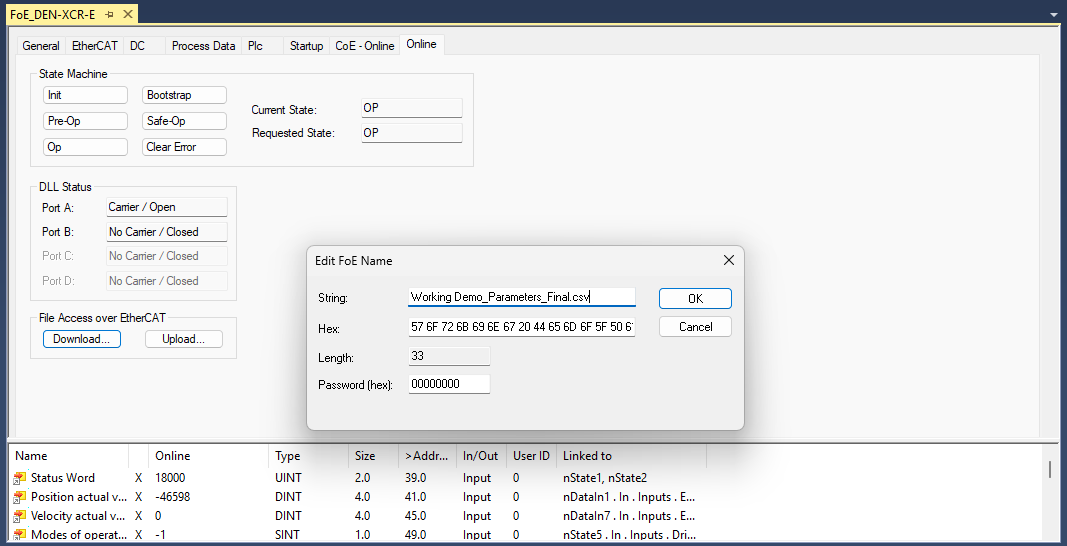
Use the ML3 FoE download button to upload the
.csvfile to your device. Ensure that the string for the file name includes .csv
-
-
-
Apply the Configuration:
-
The device will parse the file and write the defined registers.
-
If the CRC is incorrect, you will be notified. Perform a
Store Allto save the configuration to NVM in the drive.
-
Certain registers may be non-writable if the drive is not configured in the appropriate mode, resulting in a Register Write Error.
Example CSV File
v1
0xFFFFFFFF
0x2000,0x00,0x04D2
0x2000,0x01,0x162E
0x2001,0x00,0x10E1
For further details, refer to the official documentation or contact support.